
Starlink for RVs: Is It Worth It for Full-Timers?

Ellen Kietzmann brings more than 25 years of senior leadership in the RV and outdoor recreation industry. She spent 22 years at Blue Ox — rising from Vice President of Sales & HR to President — where she grew the deal…
Why trust us
RVGearInsider articles are researched by the Searchshop Editorial team using manufacturer specs, independent expert sources, and owner feedback. Our goal is simple: when an RVer searches for gear, the recommendations they read online should match what a knowledgeable dealer or experienced owner would actually suggest. We may earn a commission on qualifying affiliate purchases; it doesn't influence what we recommend — if a product changes or a better option comes along, the article changes too.
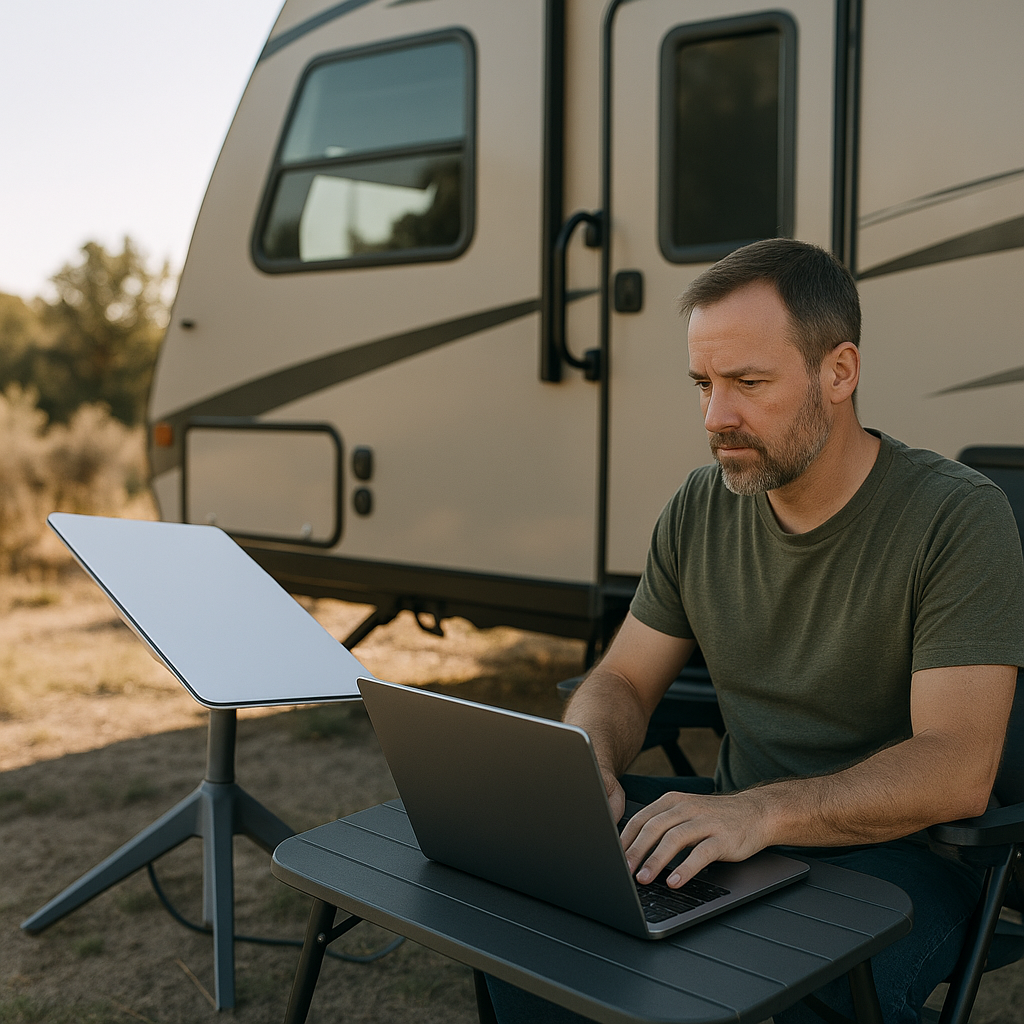
Bad campground Wi-Fi is practically an RV rite of passage. The real question isn’t whether Starlink works — it does — but whether it’s the smartest internet upgrade for full-time RVers who need dependable connectivity and don’t want to waste money on the wrong setup.
We’ve spent enough time chasing bars in remote campgrounds to be opinionated here: for most full-timers, Starlink is the best single internet upgrade you can buy, but not every Starlink plan or hardware setup makes sense. The right answer depends on how often you boondock, whether you work remotely, how much roof space you have, and how much power you’re willing to burn.
Best RV internet options we’d actually consider

Below are the five products and setups we’d put our own money into right now.
Comparison table
| Product | Typical Price | Monthly Cost | Best For | Key Specs | Main Drawback |
|---|---|---|---|---|---|
| Starlink Standard Kit | $599 | Roam Unlimited about $165/mo | Most full-timers | 110+ Mbps typical, Wi-Fi router included, portable dish | Needs open sky, higher power draw |
 Starlink Mini Starlink Mini |
$599 | Roam 50GB about $50/mo or Unlimited about $165/mo | Weekend use, backup internet, low-power rigs | Compact integrated unit, DC-friendly, lighter carry | Slower than Standard, not ideal as sole heavy-use option |
| Peplink MAX BR1 Pro 5G + external antenna | Router about $999 | Data plan varies, often $90-$150+/mo | Cellular-first travelers | 5G router, dual SIM, advanced failover | Expensive and plan-dependent |
| Netgear Nighthawk M6 Pro (MR6550) | About $799 | Data plan varies | Urban/suburban full-timers | Wi-Fi 6E, 5G hotspot, portable | Carrier limits and deprioritization |
| Winegard Connect T 2.0 4G2 | About $399 | Varies by carrier | Casual users on a budget | Roof-mount style connectivity hub | 4G platform feels dated for full-time work |
Prices and plan costs vary by retailer and region, but these are realistic street prices at the time of writing.
Our verdict up front
Our #1 recommendation: Starlink Standard Kit + Roam Unlimited plan for most full-time RVers.
Why? It gives the best mix of speed, nationwide coverage, simple setup, and real-world usability. It’s not cheap, and it’s not perfect under trees, but in open-sky camping it beats cellular-only setups for consistency in remote areas.
If you already spend most nights near towns and interstates, a premium 5G hotspot can still be the better value. But if your travel style includes BLM land, national forest campgrounds, or rural state parks, Starlink is usually worth it.
The 5 best picks, tested and ranked

1. Starlink Standard Kit — Best overall for full-timers
Price: about $599 hardware
Plan: Roam Unlimited about $165/month
This is the one we recommend most often. The Standard Kit includes the dish, Gen 3 router, kickstand, and cables. In the field, we’ve seen download speeds commonly land in the 50 to 200 Mbps range with usable upload for Zoom, cloud backups, and streaming. That range is broad because Starlink performance depends on congestion and sky visibility, but it’s still the most reliable way we’ve found to get online far from cell towers.
Pros
- Best remote-area performance for most RVers
- Fast enough for remote work and streaming
- Easier setup than piecing together a cellular system
- Works where hotspot plans often fail completely
Cons
- Higher monthly cost than many cellular plans
- Power draw is significant for solar/battery campers
- Trees are the enemy
2. Starlink Mini — Best for compact rigs and low-power users
Price: about $599 hardware
Plan: Roam 50GB about $50/month; Roam Unlimited about $165/month
The Mini is the interesting option for vanlifers and anyone who hates bulky gear. It’s smaller, lighter, and easier to power directly from DC. We like it as a backup internet system or for lighter-duty travelers, but for full-timers with heavy work demands, we still prefer the Standard Kit for better throughput and overall stability.
Pros
- Very compact and portable
- Better fit for small RVs and vans
- Lower power needs than a full-size dish
- Flexible plan options
Cons
- Not the fastest Starlink hardware
- 50GB plan disappears quickly with streaming or work
- Still needs open sky for best results
3. Peplink MAX BR1 Pro 5G + external antenna — Best cellular-first alternative
Price: about $999 for router, plus antenna costs
Plan: varies widely by carrier and reseller
If you know networking and spend more time near populated areas than remote boondocking sites, Peplink is the gold-standard cellular setup. Dual SIM support, robust failover, and serious router controls make it a favorite among tech-savvy RVers. We love Peplink gear, but it’s not simple and it’s not cheap once you add quality antennas and data plans.
Pros
- Excellent carrier flexibility
- Strong routing and failover features
- Great for combining multiple internet sources
- More control than consumer hotspots
Cons
- Steep learning curve
- Total system cost climbs fast
- Cellular still loses in true dead zones
4. Netgear Nighthawk M6 Pro — Best hotspot for town-based travelers
Price: about $799
Plan: carrier data plan required
The Nighthawk M6 Pro is one of the better premium 5G hotspots we’ve tested. In strong AT&T coverage, it’s fast. Very fast. But hotspot performance falls apart once you leave good tower coverage, and many plans come with throttling, deprioritization, or hidden limits that make “unlimited” less impressive than advertised.
Pros
- Excellent speeds in strong 5G areas
- Portable and easy to use
- Good option for RVers who stay near cities
Cons
- Coverage is only as good as the carrier
- Premium price for a hotspot
- Data-plan fine print matters a lot
5. Winegard Connect T 2.0 4G2 — Best budget integrated option
Price: about $399
Plan: carrier-dependent
We’re including this because some RVers want a simple, permanently mounted connectivity hub. But we’ll be blunt: for full-time use in 2026, a 4G-focused system is hard to recommend over newer 5G gear or Starlink. It works for light browsing and email, but it’s not our first choice for serious connectivity.
Pros
- Lower upfront cost
- Integrated approach for simpler installs
- Fine for light-duty users
Cons
- Dated 4G platform
- Limited value for remote workers
- Outclassed by modern 5G and satellite options
Side-by-side analysis: where Starlink wins — and where it doesn’t
For coverage, Starlink is the clear winner. It doesn’t care whether the nearest cell tower is overloaded or 30 miles away. If you have power and a clear view of the sky, you usually have internet.
For speed in populated areas, a top-tier 5G setup like the Peplink or Nighthawk can absolutely beat Starlink. We’ve seen cellular pull stronger upload speeds in metro and suburban zones, which matters for large file transfers and live broadcasting.
For ease of use, Starlink Standard wins again. Set the dish, connect the app, and check obstructions. A Peplink system is more flexible, but it’s also a project.
For power efficiency, Starlink Mini wins over Standard, and cellular gear usually wins over both. If you’re guarding every amp-hour, that matters.
Clear winner
Winner: Starlink Standard Kit
If you’re a full-timer who regularly camps outside major population centers, this is the most dependable all-around internet solution we’ve tested. It’s expensive, yes. But it solves the problem that matters most: getting online where other options simply can’t.
How to set up Starlink in an RV
What you’ll need
- Starlink Standard Kit or Starlink Mini
- Active Starlink Roam plan
- 120V AC power source, or a compatible DC power setup/inverter
- Starlink app on your phone
- Tripod, pole mount, or stable ground placement
- Surge protection for campground power
- Optional: cable entry gland, router mount, weatherproof storage bin
Step-by-step setup
1. Pick the right Starlink hardware for your rig
If you’re in a fifth wheel, travel trailer, or motorhome with room to store gear, choose the Starlink Standard Kit. If you’re in a van or truck camper and care about low power draw, look hard at Starlink Mini.
2. Choose the right plan before you hit the road
For true full-timers, we’d skip capped plans unless this is a backup connection. Roam Unlimited is the safer choice if you work online, stream TV, or rely on cloud apps daily.
3. Test your campsite for sky visibility
Use the Starlink app’s obstruction tool before setting up. This is the make-or-break step. A gorgeous wooded site can be a terrible Starlink site.
Safety callout: Never place the dish where someone can trip over cables, and never route cables through doors or slide seals in a way that can pinch insulation or create water leaks.
4. Set the dish away from the RV if needed
One of Starlink’s biggest advantages is portability. If your roof is shaded, move the dish 50 to 100 feet away into open sky using a compatible cable and secure placement.
5. Power it properly
The Standard Kit typically draws more power than a hotspot, so battery campers need to plan for it. If you’re boondocking, make sure your inverter, battery bank, and solar input can support several hours of use.
Pro tip: We recommend running Starlink only when you need it if you’re on limited battery capacity. That alone can make a Standard Kit much more practical off-grid.
6. Lock down your Wi-Fi network
Change the default network name and password immediately. If you’re in crowded campgrounds, use WPA2/WPA3 security and keep firmware updated through the app.
7. Build a backup plan
Even if Starlink is your primary internet, we still recommend a cellular hotspot backup. Trees, severe weather, and hardware issues happen. Full-timers should never rely on one connection only.
Is Starlink worth it for full-timers?
In our opinion, yes — for most full-time RVers, Starlink is worth it.
It’s especially worth it if you:
- Work remotely from the road
- Camp in rural public lands or state parks
- Need reliable streaming, video calls, or navigation updates
- Are tired of carrier dead zones and weak campground Wi-Fi
It may not be worth it if you:
- Stay mostly in RV resorts with strong cellular coverage
- Rarely use more than email and light browsing
- Need the lowest possible monthly cost
- Camp almost exclusively under heavy tree cover
Our bottom line is simple: Starlink is the best primary internet option for full-timers who travel beyond reliable cell coverage. For everyone else, a good 5G setup might be the better value.
Pro tips from our field testing
- Carry a small tripod or ground stand even if you plan a permanent mount.
- Don’t assume roof mounting is always best; portable placement often beats it in wooded campsites.
- Pair Starlink with a hotspot from a different network for redundancy.
- Watch your power budget, especially in winter or during extended boondocking.
- Check plan terms before travel if you expect heavy use in congested regions.
FAQ
1. Can Starlink work while driving an RV?
Yes, but only with compatible hardware and service terms designed for in-motion use. Most RVers are better off treating Starlink as a parked-campsite internet solution unless they specifically need mobile in-motion connectivity.
2. Does Starlink work under trees?
Not well. Partial obstructions can cause dropouts, especially during video calls and gaming. The more open sky you have, the better Starlink performs.
3. How much power does Starlink use in an RV?
It varies by model, but the Standard system uses significantly more power than a hotspot. That matters for boondocking. The Mini is the better choice if low power draw is a priority.
4. Is Starlink better than a 5G hotspot for RV travel?
In remote areas, yes. In cities and strong coverage zones, a premium 5G hotspot can be cheaper and sometimes faster. For full-timers who roam widely, Starlink is usually the better primary connection.
If we were outfitting an RV for full-time travel tomorrow, we’d buy the Starlink Standard Kit, keep a 5G hotspot as backup, and call it the least frustrating internet setup currently available for life on the road.
Top Picks & Comparison
| # | Product | Price | Rating | ||
|---|---|---|---|---|---|
| #1 | |
STARLINK Mini Kit - 4th Gen Mini Antenna with Wi-Fi Router – Star Links High-Speed Internet for RVs, Camping, Travel, Remote Work, and Off-Grid Use, Internet Kit |
$459.00 | (93) | View on Amazon |
| #2 |  |
Suction Cup Roof Mount for Starlink Gen 3 – 300LB Heavy Duty Vacuum Mount for Cars/Trucks/RVs/Vans/Boats, Quick-Release Removable Sunroof/Window Holder for Starlink Standard Gen 3 Dish |
$65.99 | (3) | View on Amazon |
| #3 |  |
SpaceX Starlink Mini Satellite Dish – 4th Gen Portable Antenna with Advanced Phase Array Technology – High-Speed Internet Kit for RV, Camping, Remote Work, and Off-Grid Living |
$331.96 | (169) | View on Amazon |
| #4 |  |
Starlink Mini – Portable Satellite Internet for Boats, RVs, Camping, Off-Grid Adventures - Marine & Land Mobility - Region Free |
$699.99 | (2) | View on Amazon |